![logo-patch-retention.png]](https://help.patchretention.com/hs-fs/hubfs/Email%20Campaign,%20Free%20Trial/logo-patch-retention.png?height=40&name=logo-patch-retention.png)
Overview
Patch can use CenterEdge discount codes to track which SMS or email message led to a purchase. This is called conversion attribution.
When a discount code is created in CenterEdge and tagged in a Patch message, Patch can connect the final purchase back to the exact blast or automation message that promoted the offer.
This helps your team understand which campaigns are driving revenue, not just clicks or replies.
How Discount Code Attribution Works
Discount code attribution requires both CenterEdge and Patch to work together.
At a high level:
- The integration's data pumps are on version 2 or later.
-
A Discount must be created within CenterEdge with a Source Code.
-
That same code is added to a Patch outgoing message.
-
A customer receives the Patch message.
-
The customer uses the code during a CenterEdge purchase, either online or in person.
-
CenterEdge sends the order data to Patch through the data pump.
-
Patch sees the discount code in the order data.
-
Patch attributes the purchase conversion to the message, blast, or automation block that was tagged with that code.
When this happens, the conversion is credited to the tagged Patch message instead of another message the customer may have received.
Important Terminology
Discount Code
A discount code is the code promoted to customers in your Patch message.
Example:
CODE001
This may appear in the message copy, such as:
“Use code CODE001 this weekend for $5 off admission.”
Source Code
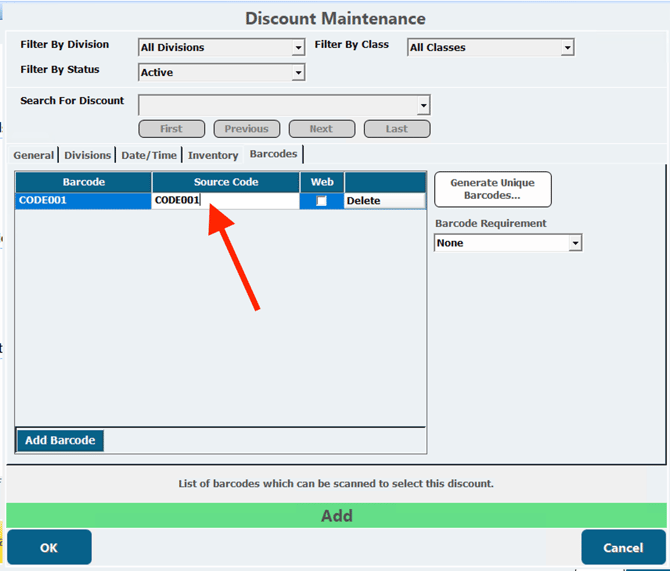
In the CenterEdge Manager Console under Cash Control - Discount Maintenance, a discount should be created with a unique Source Code specified in the Barcodes tab.
Patch uses the Source Code value to match the order back to the outgoing message.
In the CenterEdge discount setup, the Source Code should match the code you plan to use in Patch.
Conversion Attribution
Conversion attribution is the process of connecting a completed purchase back to the message that influenced it.
For CenterEdge discount codes, attribution happens when Patch receives an order event that includes the tagged discount code.
Where Discount Codes Can Be Tagged in Patch
Discount codes can be tagged on outgoing messages in:
Blasts
Use this when you are sending a one-time campaign to a segment of customers.
Examples:
-
Weekend promotion
-
Birthday sale
-
Spring break offer
-
Membership push
-
Holiday campaign
Automations
Use this when the message is part of an automated workflow.
Examples:
-
Win-back campaign
-
Birthday automation
-
First-visit follow-up
-
Membership renewal reminder
-
Abandoned booking or abandoned cart follow-up, where supported
One Code Is Used for the Entire Message
Patch discount code tagging uses the same discount code for all customers who receive that message.
This means the code is not unique per person. It is tied to the message, blast, or automation block.
Example:
A blast is sent to 5,000 customers with the tagged code SPRING10.
Every customer receives the same code.
If a customer uses SPRING10 in a CenterEdge purchase and Patch receives that order data, Patch attributes the conversion to that blast.
Best Practice: Use One Unique Code Per Blast or Automation Block
For cleaner reporting, use a unique discount code for each campaign or automation message.
Recommended structure:
-
One code per blast
-
One code per automation message block
-
Avoid reusing the same code across multiple active campaigns
This makes it easier to compare results between Patch and CenterEdge.
Example
Instead of using one general code like:
SAVE10
Use campaign-specific codes like:
APRILBLAST10
BIRTHDAY10
WINBACK10
MEMBERRENEW10
This helps your team know exactly which campaign generated the order.
Why You Should Avoid Reusing Codes
Reusing the same discount code across multiple Patch messages can make attribution harder to understand.
For example, if SAVE10 is used in:
-
A March blast
-
An April blast
-
A win-back automation
-
A birthday automation
then it may be difficult to know which campaign actually influenced the purchase.
Patch will attribute conversions based on the tagged message logic and received order data, but operationally, reporting is much cleaner when each message or automation block has its own code.
Example Workflow
Step 1: Create the Source Code in CenterEdge
In CenterEdge, create or update the discount and add the Source Code that customers will use.
Example:
CODE001
Make sure the discount with Source Code is active and available for the type of purchase you want to track.
Step 2: Add the Code to the Patch Message
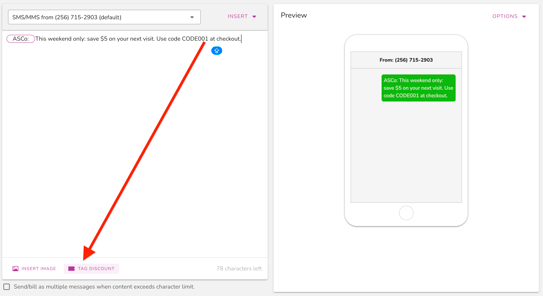
In Patch, create your SMS or email message.
Example SMS:
This weekend only: save $5 on your next visit. Use code CODE001 at checkout.
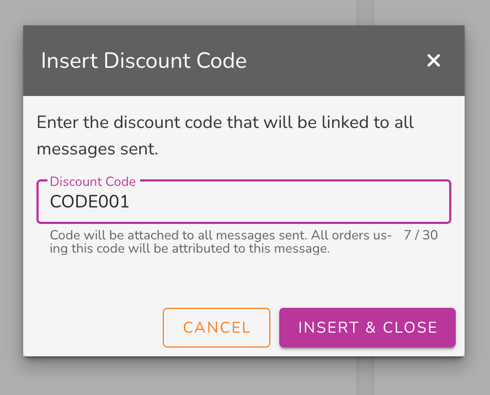
Then tag the outgoing message with the same discount code:
CODE001

Step 3: Send the Blast or Activate the Automation
Once the message is sent, Patch knows that this specific message is associated with that discount code.
Step 4: Customer Makes a Purchase
The customer can use the code during a qualifying CenterEdge purchase.
This may happen:
-
Online
-
In person
-
Anywhere the CenterEdge discount code is accepted
Step 5: Patch Receives the Order Event
When CenterEdge sends the order data to Patch through the data pump, Patch checks whether the order includes the discount code.
If the order contains the tagged code, Patch attributes the conversion to the Patch message that used that code.
Attribution Rules
A purchase can be attributed to a Patch message when all of the following are true:
-
The discount Source Code exists in CenterEdge.
-
The same code is tagged on the outgoing Patch message.
-
The customer receives the Patch message.
-
The customer uses that discount code in a CenterEdge purchase.
-
Patch receives the order event from CenterEdge.
-
The discount code is included in the order data sent to Patch.
If the code is missing from the order data, Patch cannot use that discount code for attribution.
Recommended Naming Convention
Use clear code names that identify the campaign, timing, or automation.
For blasts
Examples:
JANBLAST10
SPRINGSALE5
MEMDAY20
SUMMERPASS10
For automations
Examples:
BIRTHDAY10
WINBACK15
RENEWAL10
FIRSTVISIT5
For specific automation blocks
If an automation has multiple offer messages, use different codes per message block.
Example:
WINBACKDAY7
WINBACKDAY14
WINBACKDAY30
This helps you see which step in the automation is driving conversions.
Common Setup Mistakes
The code was added to the message but not tagged in Patch
If the discount code only appears in the message text but is not tagged in Patch, Patch may not know to attribute orders using that code to the message.
The Source Code was not created in CenterEdge
Patch needs the code to appear in the CenterEdge order data. If the Source Code is not set up correctly in CenterEdge, the order may not include the expected code.
The same code was used in too many campaigns
Using one code across several blasts or automations can make reporting harder to interpret.
The customer did not use the code
Patch can only attribute based on the discount code if the customer actually uses that code during the purchase.
The order data did not include the code
If CenterEdge does not send the discount code in the order data, Patch cannot match the order to the tagged message.
Best Practices
Use these guidelines for the cleanest reporting:
-
Create the Source Code in CenterEdge before sending the Patch message.
-
Tag the same code on the Patch blast or automation message.
-
Use one unique code per blast or automation block.
-
Avoid using the same code across multiple active campaigns.
-
Use clear naming so your team can identify the campaign later.
-
Test the code before sending to customers.
-
Confirm that completed orders using the code are flowing into Patch.
Summary
CenterEdge discount codes allow Patch to attribute purchases back to specific SMS and email campaigns.
To use this feature, create a Source Code in CenterEdge, tag the same discount code on the outgoing Patch message, and make sure customers use that code when purchasing.
When Patch receives the CenterEdge order event with the discount code included, the conversion is credited to the tagged blast or automation message. For the clearest reporting, use a unique discount code for each blast or automation block.