![logo-patch-retention.png]](https://help.patchretention.com/hs-fs/hubfs/Email%20Campaign,%20Free%20Trial/logo-patch-retention.png?height=40&name=logo-patch-retention.png)
The Throttle block in Patch lets you control how often a contact can go through a specific automation step. This helps prevent excessive or duplicate messages, especially when the same person may be tied to multiple records—such as parents attached to several minors.
This is essential for businesses in attractions, sports, and youth programs where families share one phone number or one guardian contact.
In This Article
- What the throttle block does
- Why Throttle Is Critical for Guardian/Minor Use Cases
- When to Use Throttle (Guardian/Minor Specific Examples)
- How to Configure the Throttle Block
- Recommended Throttle Settings for Guardian/Minor Use Cases
- Best Practices
What the Throttle Block Does
The Throttle block ensures each contact only passes through that point once within the time window you set, regardless of how many times the automation trigger fires.
This is especially important when:
-
A parent has multiple children in the system
-
Each child has their own record (minor account)
-
The automation triggers on minor activity (check-ins, bookings, events, etc.)
-
The parent shares the same phone number or email across all minors
Without throttling, the parent might receive:
-
2+ visit messages
-
2+ reminders
-
2+ promotions
-
2+ thank-you texts
all within minutes.
Throttle prevents that.
Why Throttle Is Critical for Guardian/Minor Use Cases
In Patch, a single guardian contact can be associated with multiple minors. Many automations trigger off the minor’s record, not the guardian’s. Examples:
-
Check-in automations
-
Birthday automations
-
Class/clinic/event participation
-
Visit-based prompts
-
Drop-in or program reminders
When you send messages to the guardian instead of the child (common in youth attractions), the system sees:
Multiple triggers → Same parent → Duplicate messages
A parent with 3 children could receive:
-
3 ‘Thanks for Visiting’ texts
-
3 ‘Event Coming Up’ reminders
-
3 birthday emails in the same week
if no throttle is applied.
Throttle ensures:
Parent receives only ONE message within the time period, no matter how many minors triggered the automation.
When to Use Throttle (Guardian/Minor Specific Examples)
✔️ Youth programs with families checking in multiple kids
Prevents “Thanks for visiting!” from going out 2–4 times.
✔️ Birthday automations firing off minor DOBs
Ensures only one birthday offer is sent to the parent at a time.
✔️ Sports camps, leagues, or tournaments
Parents with multiple kids won’t get duplicate schedule reminders.
✔️ Membership updates
If multiple minors use the same membership guardian, throttle blocks repeats.
How to Configure the Throttle Block
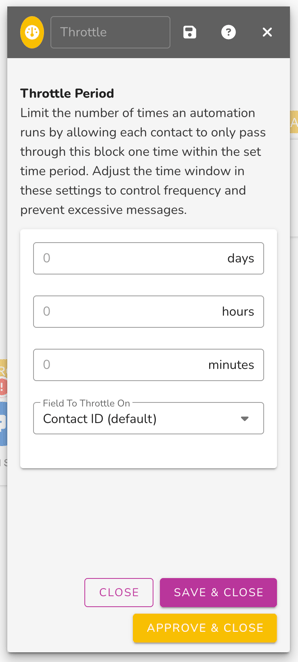
1. Add a Throttle Block to Your Automation
Add it right after your trigger or before any message-sending step.
2. Set Your Throttle Period
Choose how often a guardian should receive the message:
Examples:
1 day – Prevent duplicate visit/thank-you texts7 days – Prevent weekly promo duplicates
3. Choose the Field to Throttle On
Keep this as: Email Address or Phone (depending on if you are send an email or SMS message). This ensures throttling applies to the guardian's email or phone number, not the minor record that inherits that data from the parent record.
4. Save & Activate
When you're happy with the timing, click Approve & Close.
Recommended Throttle Settings for Guardian/Minor Use Cases
- Visit & Thank-You Messages
- Throttle: 1 day
→ Parent gets only 1 message even if 3 kids check in.
- Throttle: 1 day
- Birthday Automations
- Throttle: 7 days
→ Avoid sending multiple birthday promotions if siblings have close birthdays.
- Throttle: 7 days
- Event Reminders (camps, leagues, clinics)
- Throttle: 4–12 hours
→ Prevents duplicate reminders for multi-child households.
- Throttle: 4–12 hours
- Promo/Offer Automations
- Throttle: 7 days
→ Parents won’t receive the same promo multiple times from minors triggering it.
- Throttle: 7 days
Best Practices
✔️ Add a Throttle block any time the audience may share a guardian record
Youth sports, kids camps, attractions, or family venues.
✔️ Place throttle early in the automation
Ideally right after the trigger.
✔️ Throttle conservatively
Too short = duplicates
Too long = important messages suppressed
✔️ Test with multiple linked minors
Ensure only one message is sent to the guardian.
Need More Help?
If you’re unsure what throttle window to use for your venue’s guardian/minor setup, Patch support can recommend the best timing based on your automation goals.